

The Realest Study Materials Associate-Cloud-Engineer Dumps Updated Jul 07, 2025
LATEST Associate-Cloud-Engineer Exam Practice Material
Google Associate-Cloud-Engineer (Google Associate Cloud Engineer) Exam is a certification exam that is designed to test the proficiency of an individual in the field of cloud computing. Associate-Cloud-Engineer exam is intended for those who have knowledge and experience in the Google Cloud Platform and related technologies. Individuals who pass Associate-Cloud-Engineer exam will be recognized as Google Associate Cloud Engineers, which is a valuable certification for those seeking a career in cloud computing or IT.
To earn the Google Associate-Cloud-Engineer Certification, you need to pass a 2-hour online exam that consists of multiple-choice and multiple-select questions. Associate-Cloud-Engineer exam is designed to test your knowledge of GCP services, including Compute Engine, App Engine, Kubernetes Engine, Cloud Storage, Cloud SQL, Cloud Spanner, and BigQuery. Associate-Cloud-Engineer exam also assesses your ability to configure and manage GCP services, including networking, security, and access management.
The Google Associate Cloud Engineer Exam certification exam is intended for professionals who are involved in cloud computing or are looking to build their knowledge and skills in managing cloud services. Associate-Cloud-Engineer exam is also suitable for IT professionals who are interested in gaining knowledge of the Google Cloud Platform.
NEW QUESTION # 141
You are managing several Google Cloud Platform (GCP) projects and need access to all logs for the past 60 days. You want to be able to explore and quickly analyze the log contents. You want to follow Google- recommended practices to obtain the combined logs for all projects. What should you do?
- A. Navigate to Stackdriver Logging and select resource.labels.project_id="*"
- B. Create a Stackdriver Logging Export with a Sink destination to a BigQuery dataset. Configure the table expiration to 60 days.
- C. Configure a Cloud Scheduler job to read from Stackdriver and store the logs in BigQuery. Configure the table expiration to 60 days.
- D. Create a Stackdriver Logging Export with a Sink destination to Cloud Storage. Create a lifecycle rule to delete objects after 60 days.
Answer: B
Explanation:
Explanation
Navigate to Stackdriver Logging and select resource.labels.project_id=*. is not right.
Log entries are held in Stackdriver Logging for a limited time known as the retention period which is 30 days (default configuration). After that, the entries are deleted. To keep log entries longer, you need to export them outside of Stackdriver Logging by configuring log sinks.
Ref: https://cloud.google.com/blog/products/gcp/best-practices-for-working-with-google-cloud-audit-logging Configure a Cloud Scheduler job to read from Stackdriver and store the logs in BigQuery. Configure the table expiration to 60 days. is not right.
While this works, it makes no sense to use Cloud Scheduler job to read from Stackdriver and store the logs in BigQuery when Google provides a feature (export sinks) that does exactly the same thing and works out of the box.Ref: https://cloud.google.com/logging/docs/export/configure_export_v2 Create a Stackdriver Logging Export with a Sink destination to Cloud Storage. Create a lifecycle rule to delete objects after 60 days. is not right.
You can export logs by creating one or more sinks that include a logs query and an export destination.
Supported destinations for exported log entries are Cloud Storage, BigQuery, and Pub/Sub.Ref: https://cloud.google.com/logging/docs/export/configure_export_v2 Sinks are limited to exporting log entries from the exact resource in which the sink was created: a Google Cloud project, organization, folder, or billing account. If it makes it easier to exporting from all projects of an organication, you can create an aggregated sink that can export log entries from all the projects, folders, and billing accounts of a Google Cloud organization.Ref: https://cloud.google.com/logging/docs/export/aggregated_sinks Either way, we now have the data in Cloud Storage, but querying logs information from Cloud Storage is harder than Querying information from BigQuery dataset. For this reason, we should prefer Big Query over Cloud Storage.
Create a Stackdriver Logging Export with a Sink destination to a BigQuery dataset. Configure the table expiration to 60 days. is the right answer.
You can export logs by creating one or more sinks that include a logs query and an export destination.
Supported destinations for exported log entries are Cloud Storage, BigQuery, and Pub/Sub.Ref: https://cloud.google.com/logging/docs/export/configure_export_v2 Sinks are limited to exporting log entries from the exact resource in which the sink was created: a Google Cloud project, organization, folder, or billing account. If it makes it easier to exporting from all projects of an organication, you can create an aggregated sink that can export log entries from all the projects, folders, and billing accounts of a Google Cloud organization.Ref: https://cloud.google.com/logging/docs/export/aggregated_sinks Either way, we now have the data in a BigQuery Dataset. Querying information from a Big Query dataset is easier and quicker than analyzing contents in Cloud Storage bucket. As our requirement is to Quickly analyze the log contents, we should prefer Big Query over Cloud Storage.
Also, You can control storage costs and optimize storage usage by setting the default table expiration for newly created tables in a dataset. If you set the property when the dataset is created, any table created in the dataset is deleted after the expiration period. If you set the property after the dataset is created, only new tables are deleted after the expiration period.For example, if you set the default table expiration to 7 days, older data is automatically deleted after 1 week.Ref: https://cloud.google.com/bigquery/docs/best-practices-storage
NEW QUESTION # 142
Several employees at your company have been creating projects with Cloud Platform and paying for it with their personal credit cards, which the company reimburses. The company wants to centralize all these projects under a single, new billing account. What should you do?
- A. Create a ticket with Google Support and wait for their call to share your credit card details over the phone.
- B. Contact [email protected] with your bank account details and request a corporate billing account for your company.
- C. In the Google Cloud Platform Console, create a new billing account and set up a payment method.
- D. In the Google Platform Console, go to the Resource Manage and move all projects to the root Organization.
Answer: C
Explanation:
Reference:
https://www.whizlabs.com/blog/google-cloud-interview-questions/
NEW QUESTION # 143
You are designing an application that lets users upload and share photos. You expect your application to grow really fast and you are targeting a worldwide audience. You want to delete uploaded photos after 30 days. You want to minimize costs while ensuring your application is highly available. Which GCP storage solution should you choose?
- A. Cloud Datastore database.
- B. Multiregional Cloud Storage bucket.
- C. Cloud Filestore.
- D. Persistent SSD on VM instances.
Answer: B
Explanation:
Cloud Storage allows world-wide storage and retrieval of any amount of data at any time. We dont need to set up auto-scaling ourselves. Cloud Storage autoscaling is managed by GCP. Cloud Storage is an object store so it is suitable for storing photos. Cloud Storage allows world-wide storage and retrieval so cater well to our worldwide audience. Cloud storage provides us lifecycle rules that can be configured to automatically delete objects older than 30 days. This also fits our requirements. Finally, Google Cloud Storage offers several storage classes such as Nearline Storage ($0.01 per GB per Month) Coldline Storage ($0.007 per GB per Month) and Archive Storage ($0.004 per GB per month) which are significantly cheaper than any of the options above.
Ref: https://cloud.google.com/storage/docs
Ref: https://cloud.google.com/storage/pricing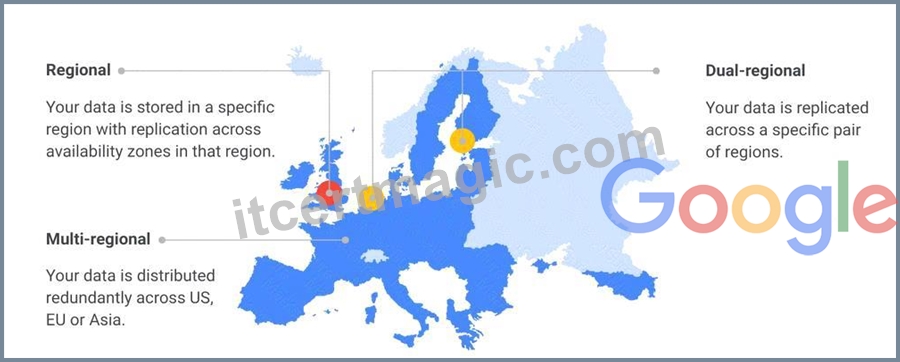
NEW QUESTION # 144
You are using multiple configurations for gcloud. You want to review the configured Kubernetes Engine cluster of an inactive configuration using the fewest possible steps. What should you do?
- A. Use kubectl config use-context and kubectl config view to review the output.
- B. Use gcloud config configurations activate and gcloud config list to review the output.
- C. Use gcloud config configurations describe to review the output.
- D. Use kubectl config get-contexts to review the output.
Answer: A
NEW QUESTION # 145
Your web application has been running successfully on Cloud Run for Anthos. You want to evaluate an updated version of the application with a specific percentage of your production users (canary deployment). What should you do?
- A. Create a new revision with the new version of the application. Add an HTTP Load Balancer in front of both revisions.
- B. Create a new service with the new version of the application. Split traffic between this version and the version that is currently running.
- C. Create a new service with the new version of the application. Add an HTTP Load Balancer in front of both services.
- D. Create a new revision with the new version of the application. Split traffic between this version and the version that is currently running.
Answer: D
Explanation:
https://cloud.google.com/kuberun/docs/rollouts-rollbacks-traffic-migration
NEW QUESTION # 146
You are migrating a business critical application from your local data center into Google Cloud. As part of your high-availability strategy, you want to ensure that any data used by the application will be immediately available if a zonal failure occurs. What should you do?
- A. Store the application data on a zonal persistent disk. Create a snapshot schedule for the disk. If an outage occurs, create a new disk from the most recent snapshot and attach it to a new VM in another zone.
- B. Store the application data on a regional persistent disk. Create a snapshot schedule for the disk. If an outage occurs, create a new disk from the most recent snapshot and attach it to a new VM in another zone.
- C. Store the application data on a zonal persistent disk. If an outage occurs, create an instance in another zone with this disk attached.
- D. Store the application data on a regional persistent disk If an outage occurs, create an instance in another zone with this disk attached.
Answer: D
NEW QUESTION # 147
You deployed an App Engine application using gcloud app deploy, but it did not deploy to the intended project. You want to find out why this happened and where the application deployed. What should you do?
- A. Go the Cloud Shell and run gcloud config list to review the Google Cloud configuration used for deployment.
- B. Check the web-application.xml file for your application and check project settings.
- C. Check the app.yaml file for your application and check project settings.
- D. Go to Deployment Manager and review settings for deployment of applications.
Answer: C
NEW QUESTION # 148
You need to verify that a Google Cloud Platform service account was created at a particular time. What should you do?
- A. Filter the Activity log to view the Data Access category. Filter the Resource type to Service Account.
- B. Filter the Activity log to view the Data Access category. Filter the Resource type to Google Project.
- C. Filter the Activity log to view the Configuration category. Filter the Resource type to Service Account.
- D. Filter the Activity log to view the Configuration category. Filter the Resource type to Google Project.
Answer: B
NEW QUESTION # 149
Your company has a single sign-on (SSO) identity provider that supports Security Assertion Markup Language (SAML) integration with service providers. Your company has users in Cloud Identity. You would like users to authenticate using your company's SSO provider. What should you do?
- A. In Cloud Identity, set up SSO with a third-party identity provider with Google as a service provider.
- B. Obtain OAuth 2.0 credentials, configure the user consent screen, and set up OAuth 2.0 for Web Server Applications.
- C. Obtain OAuth 2.0 credentials, configure the user consent screen, and set up OAuth 2.0 for Mobile & Desktop Apps.
- D. In Cloud Identity, set up SSO with Google as an identity provider to access custom SAML apps.
Answer: A
Explanation:
https://support.google.com/cloudidentity/answer/6262987?hl=en&ref_topic=7558767
NEW QUESTION # 150
You want to configure 10 Compute Engine instances for availability when maintenance occurs. Your requirements state that these instances should attempt to automatically restart if they crash. Also, the instances should be highly available including during system maintenance. What should you do?
- A. Create an instance group for the instances. Set the 'Autohealing' health check to healthy (HTTP).
- B. Create an instance template for the instances. Set the 'Automatic Restart' to on. Set the 'On-host maintenance' to Migrate VM instance. Add the instance template to an instance group.
- C. Create an instance template for the instances. Set 'Automatic Restart' to off. Set 'On-host maintenance' to Terminate VM instances. Add the instance template to an instance group.
- D. Create an instance group for the instance. Verify that the 'Advanced creation options' setting for 'do not retry machine creation' is set to off.
Answer: B
Explanation:
Create an instance template for the instances so VMs have same specs.
Set the 'Automatic Restart' to on to VM automatically restarts upon crash. Set the "~On-host maintenance' to Migrate VM instance.
This will take care of VM during maintenance window. It will migrate VM instance making it highly available Add the instance template to an instance group so instances can be managed.
* onHostMaintenance: Determines the behavior when a maintenance event occurs that might cause your instance to reboot.
* [Default] MIGRATE, which causes Compute Engine to live migrate an instance when there is a maintenance event.
* TERMINATE, which stops an instance instead of migrating it.
* automaticRestart: Determines the behavior when an instance crashes or is stopped by the system.
* [Default] true, so Compute Engine restarts an instance if the instance crashes or is stopped.
* false, so Compute Engine does not restart an instance if the instance crashes or is stopped.
Enabling automatic restart ensures that compute engine instances are automatically restarted when they crash. And Enabling Migrate VM Instance enables live migrates i.e. compute instances are migrated during system maintenance and remain running during the migration.
Automatic Restart If your instance is set to terminate when there is a maintenance event, or if your instance crashes because of an underlying hardware issue, you can set up Compute Engine to automatically restart the instance by setting the automaticRestart field to true. This setting does not apply if the instance is taken offline through a user action, such as calling sudo shutdown, or during a zone outage. Ref: https://cloud.google.com/compute/docs/instances/setting-instance-scheduling-options#autorestart Enabling the Migrate VM Instance option migrates your instance away from an infrastructure maintenance event, and your instance remains running during the migration. Your instance might experience a short period of decreased performance, although generally, most instances should not notice any difference. This is ideal for instances that require constant uptime and can tolerate a short period of decreased performance. Ref: https://cloud.google.com/compute/docs/instances/setting-instance-scheduling-options#live_migrate
NEW QUESTION # 151
All development (dev) teams in your organization are located in the United States. Each dev team has its own Google Cloud project. You want to restrict access so that each dev team can only create cloud resources in the United States (US). What should you do?
- A. Create a folder to contain all the dev projects Create an organization policy to limit resources in US locations.
- B. Create an organization to contain all the dev projects. Create an Identity and Access Management (IAM) policy to limit the resources in US regions.
- C. Create an Identity and Access Management <IAM) policy to restrict the resources locations in the US.
Apply the policy to all dev projects. - D. Create an Identity and Access Management (IAM)policy to restrict the resources locations in all dev projects. Apply the policy to all dev roles.
Answer: A
NEW QUESTION # 152
Your organization has strict requirements to control access to Google Cloud projects. You need to enable your Site Reliability Engineers (SREs) to approve requests from the Google Cloud support team when an SRE opens a support case. You want to follow Google-recommended practices. What should you do?
- A. Add your SREs to roles/accessapproval approver role.
- B. Add your SREs to a group and then add this group to roles/iam roleAdmin role.
- C. Add your SREs to roles/iam.roleAdmin role.
- D. Add your SREs to a group and then add this group to roles/accessapproval approver role.
Answer: C
NEW QUESTION # 153
You have developed a containerized web application that will serve Internal colleagues during business hours.
You want to ensure that no costs are incurred outside of the hours the application is used. You have just created a new Google Cloud project and want to deploy the application. What should you do?
- A. Deploy the container on Cloud Run (fully managed), and set the minimum number of instances to zero.
- B. Deploy the container on App Engine flexible environment with autoscaling. and set the value min_instances to zero in the app yaml
- C. Deploy the container on App Engine flexible environment with manual scaling, and set the value instances to zero in the app yaml
- D. Deploy the container on Cloud Run for Anthos, and set the minimum number of instances to zero
Answer: A
Explanation:
Explanation
https://cloud.google.com/kuberun/docs/architecture-overview#components_in_the_default_installation
NEW QUESTION # 154
You are deploying an application to a Compute Engine VM in a managed instance group. The application must be running at all times, but only a single instance of the VM should run per GCP project. How should you configure the instance group?
- A. Set autoscaling to On, set the minimum number of instances to 1, and then set the maximum number of instances to 1.
- B. Set autoscaling to Off, set the minimum number of instances to 1, and then set the maximum number of instances to 1.
- C. Set autoscaling to Off, set the minimum number of instances to 1, and then set the maximum number of instances to 2.
- D. Set autoscaling to On, set the minimum number of instances to 1, and then set the maximum number of instances to 2.
Answer: A
Explanation:
Explanation
https://cloud.google.com/compute/docs/autoscaler#specifications
Autoscaling works independently from autohealing. If you configure autohealing for your group and an instance fails the health check, the autohealer attempts to recreate the instance. Recreating an instance can cause the number of instances in the group to fall below the autoscaling threshold (minNumReplicas) that you specify.
Since we need the application running at all times, we need a minimum 1 instance.
Only a single instance of the VM should run, we need a maximum 1 instance.
We want the application running at all times. If the VM crashes due to any underlying hardware failure, we want another instance to be added to MIG so that application can continue to serve requests. We can achieve this by enabling autoscaling. The only option that satisfies these three is Set autoscaling to On, set the minimum number of instances to 1, and then set the maximum number of instances to 1.
Ref: https://cloud.google.com/compute/docs/autoscaler
NEW QUESTION # 155
You are building a product on top of Google Kubernetes Engine (GKE). You have a single GKE cluster. For each of your customers, a Pod is running in that cluster, and your customers can run arbitrary code inside their Pod. You want to maximize the isolation between your customers' Pods. What should you do?
- A. Use the cos_containerdimage for your GKE nodes. Add a nodeSelector with the value cloud.google.com/gke-os-distribution: cos_containerdto the specification of your customers' Pods.
- B. Create a GKE node pool with a sandbox type configured to gvisor. Add the parameter runtimeClassName: gvisor to the specification of your customers' Pods.
- C. Use the Container Analysis API to detect vulnerabilities in the containers used by your customers' Pods.
- D. Use Binary Authorization and whitelist only the container images used by your customers' Pods.
Answer: B
Explanation:
You can enable GKE Sandbox on your cluster to isolate untrusted workloads in sandboxes on the node. GKE Sandbox is built using gVisor, an open source project.
https://cloud.google.com/kubernetes-engine/docs/concepts/security-
overview?hl=en#protecting_nodes_from_untrusted_workloads
NEW QUESTION # 156
You have created an application that is packaged into a Docker image. You want to deploy the Docker image as a workload on Google Kubernetes Engine. What should you do?
- A. Upload the image to Cloud Storage and create a Kubernetes Service referencing the image.
- B. Upload the image to Container Registry and create a Kubernetes Deployment referencing the image.
- C. Upload the image to Container Registry and create a Kubernetes Service referencing the image.
- D. Upload the image to Cloud Storage and create a Kubernetes Deployment referencing the image.
Answer: B
Explanation:
Explanation
A deployment is responsible for keeping a set of pods running. A service is responsible for enabling network access to a set of pods.
NEW QUESTION # 157
......
Study HIGH Quality Associate-Cloud-Engineer Free Study Guides and Exams Tutorials: https://www.itcertmagic.com/Google/real-Associate-Cloud-Engineer-exam-prep-dumps.html
New Associate-Cloud-Engineer Actual Exam Dumps, Google Practice Test: https://drive.google.com/open?id=1cLShew0YC8QpU3kCL3KyK5MZIJ9XcqEE