

First Attempt Guaranteed Success in 220-1101 Exam 2026
Real 220-1101 Exam Questions are the Best Preparation Material
CompTIA 220-1101, also known as the CompTIA A+ Certification Exam: Core 1, is a certification exam that tests the foundational knowledge and skills required to work in the IT industry. It covers a range of topics including hardware, networking, mobile devices, and troubleshooting. 220-1101 exam is the first of two exams required to earn the CompTIA A+ certification.
CompTIA A+ Certification Exam: Core 1 (220-1101) is a certification exam that is designed to validate the knowledge and skills of IT professionals in the field of computer hardware and software. 220-1101 exam is one of the two exams required to earn the CompTIA A+ certification, which is a globally recognized credential that is highly valued by employers in the IT industry. 220-1101 exam is intended for individuals who have a basic understanding of computer hardware and software and want to enhance their knowledge and skills to advance their careers in the IT industry.
CompTIA 220-1101 (CompTIA A+ Certification Exam: Core 1) is a certification exam that tests the foundational knowledge and skills required for a career in IT support. 220-1101 exam is the first of two exams required to earn the CompTIA A+ certification and covers a wide range of topics, including hardware, networking, mobile devices, and troubleshooting. Candidates who pass the exam will have demonstrated a solid foundation in IT support and will be well-prepared for a career in this field.
NEW QUESTION # 317
Which of the following should a technician use in DNS to map a device to an IPv6 address?
- A. AAAA
- B. CNAME
- C. A
- D. MX
Answer: A
Explanation:
In DNS (Domain Name System), the AAAA record is used to map a domain or device to an IPv6 address. IPv6 addresses are 128-bit addresses, and the AAAA record is specifically designed for handling these larger addresses.
NEW QUESTION # 318
An office manager reports that a printer is experiencing performance issues. Printouts are smudging when they are handled, and, recently whenever they need to print legal sized documents, the paper jams before anything is printed on it.
The following paper sizes are used:
Letter (8.5x11in/21.59x27.94cm)
Legal (8.5x14in/21.59x35.56cm)
Oversized (11x17in/27.94x43.18cm)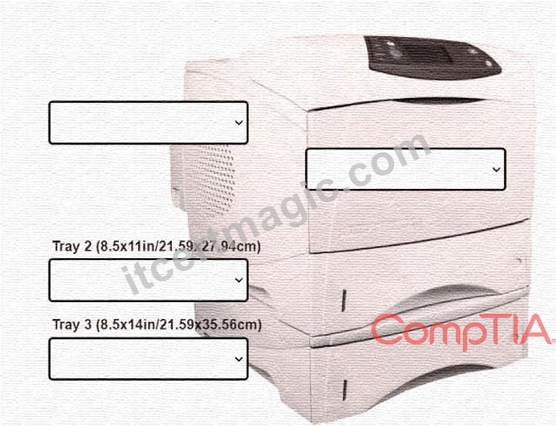
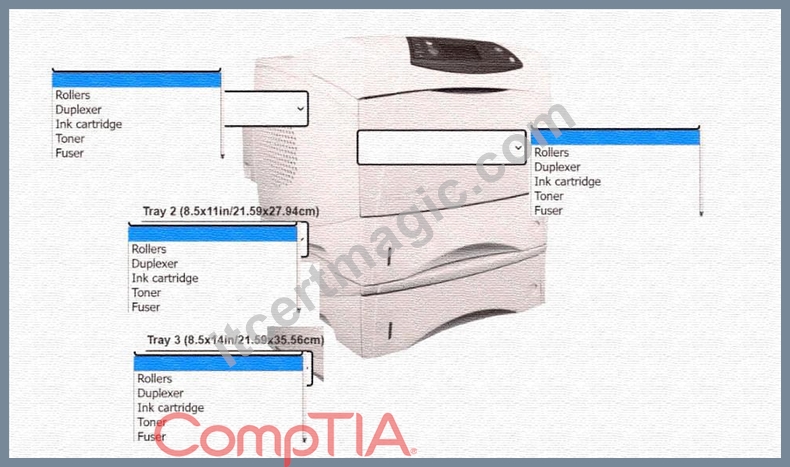
INSTRUCTIONS
Using the dropdown menus, select from the
available printer parts to replace only the
faulty components on the office printer to
resolve the stated issues.
If at any time you would like to bring back
the initial state of the simulation, please click
the Reset All button.
Answer:
Explanation: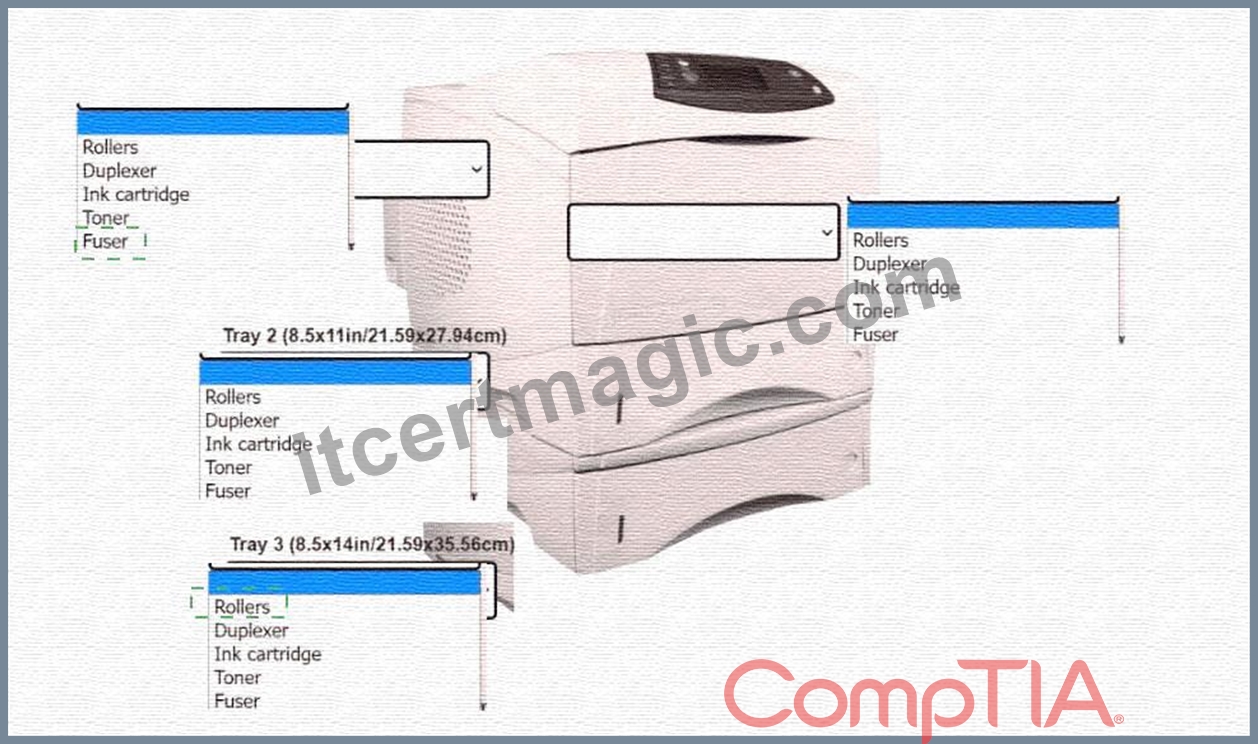
Explanation: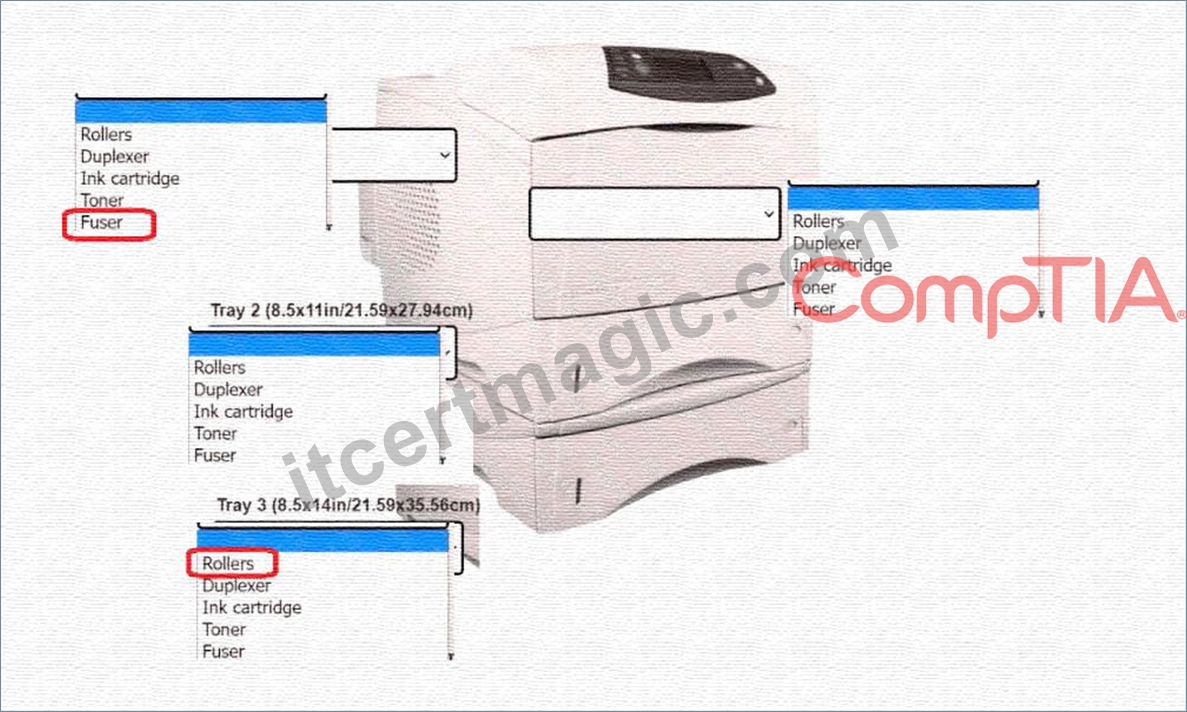
NEW QUESTION # 319
Which of the following types of devices MOST often uses a Thunderbolt cable?
- A. Chromebook
- B. Linux PC
- C. Apple laptop
- D. Android mobile
Answer: C
Explanation:
CompTIA study guide says Apple Devices use thunderbolt and lightning cables the most, but it is being implemented in Windows and Linux products.
NEW QUESTION # 320
A user reported that a laptop would no longer turn on after the battery was depleted, even though the laptop was charged the night before. An on-site technician was dispatched with a spare laptop and verified that the AC adapter and power cord were functional. Which of the following was the most likely cause of the issue?
- A. Damaged port
- B. Swollen battery
- C. Excessive wattage
- D. Calibration corruption
Answer: B
Explanation:
A swollen battery can prevent a laptop from powering on as it disrupts connectivity or damages internal components.
NEW QUESTION # 321
Which of the following technologies utilizes millimeter wave to achieve high data rates?
- A. 802.11ac
- B. NFC
- C. 5G
- D. Z-Wave
Answer: C
NEW QUESTION # 322
A small ISP has hired a new technician Joe, the new technician, is being trained to configure customers* home networks.
The trailing instructor gives me technician a starter kit with cables, cable ends, and other network equipment and asks mm to build a working network.
The computer should be connected to have internet connectivity and the phone should be connected to have a dial tone.
INSTRUCTIONS
Use the appropriate cables. cable ends, tools and equipment to configure the network ana connect an components accordingly.
There are 3 steps and the simulation starts on step 1.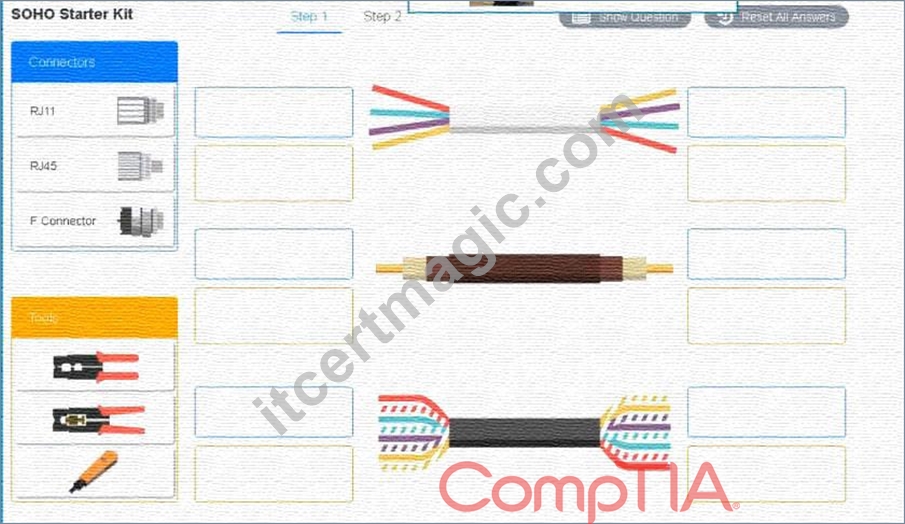
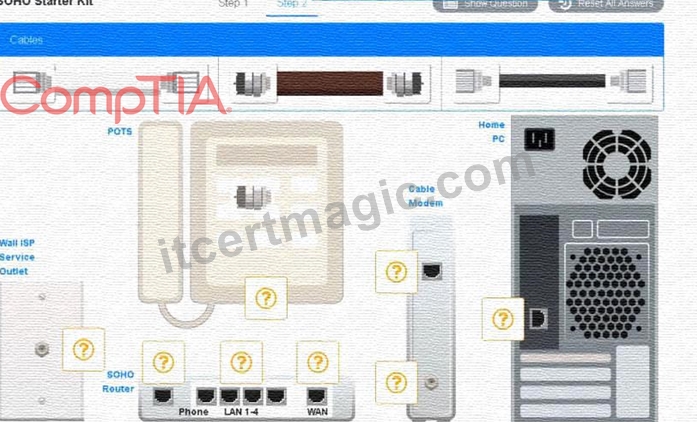
Answer:
Explanation:
See the answer below in explanation part.
Explanation:
Answer of both steps below.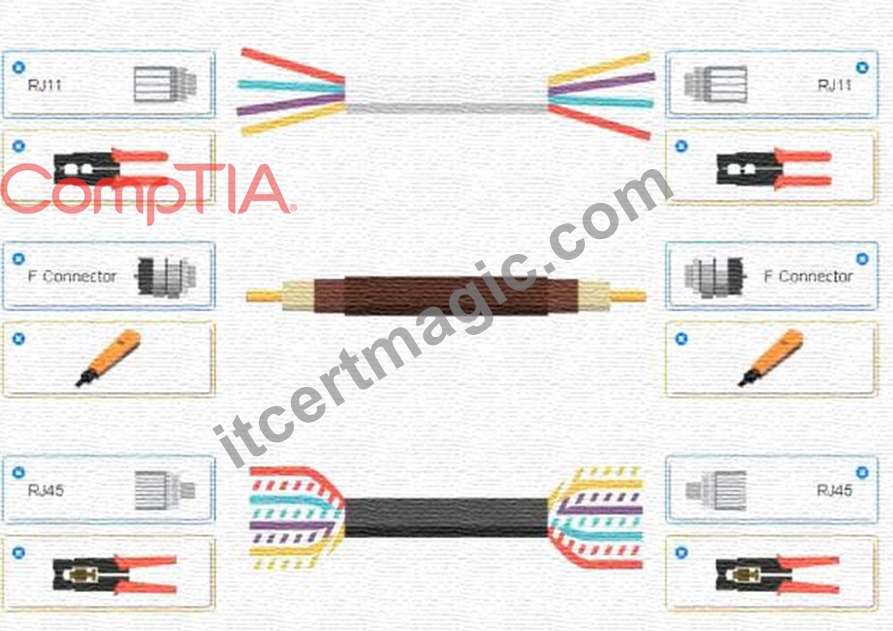
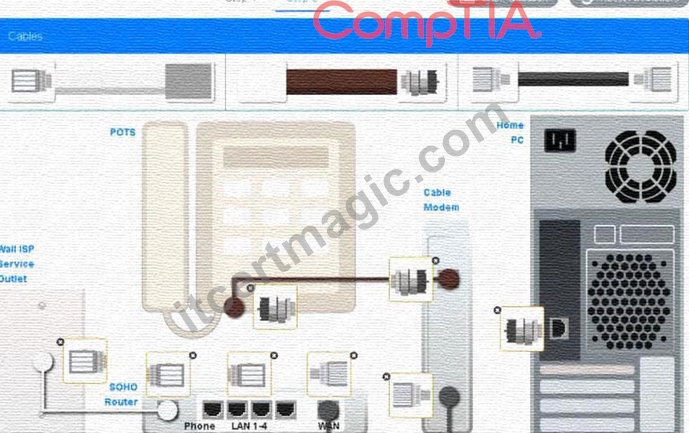
NEW QUESTION # 323
A technician assembled a new PC. After a few minutes, the computer slows down and then shuts itself off.
Which of the following is the most likely cause of the failure?
- A. The GPU needs additional power.
- B. The motherboard is incompatible.
- C. The memory is insufficient.
- D. Thermal paste was not used.
Answer: D
Explanation:
The most likely cause of the failure is A. Thermal paste was not used.
Thermal paste, also known as thermal grease or thermal compound, is a substance that is applied between the CPU and the heat sink to improve the heat transfer and cooling of the CPU. Thermal paste fills the gaps and irregularities between the CPU and the heat sink, creating a better contact and reducing the thermal resistance .
According to some web search results , some signs and symptoms of not using thermal paste or using it incorrectly are:
*The CPU overheats and slows down or shuts down to prevent damage
*The CPU fan spins faster and louder to try to cool down the CPU
*The PC performance drops or becomes unstable
*The PC crashes or displays errors or blue screens
To fix this issue, the technician should apply thermal paste properly between the CPU and the heat sink, following these steps :
*Turn off the PC and unplug it from the power source
*Open the PC case and locate the CPU fan and heat sink
*Remove the CPU fan and heat sink from the motherboard
*Clean the surfaces of the CPU and heat sink with a lint-free cloth and alcohol
*Apply a small amount of thermal paste (about the size of a grain of rice) in the center of the CPU
*Reattach the heat sink and CPU fan to the motherboard, making sure they are aligned and secured
*Close the PC case and plug it back to the power source
The GPU needs additional power, the memory is insufficient, or the motherboard is incompatible are not likely causes of the failure, since they would not cause the PC to overheat and shut down after a few minutes.
The GPU needs additional power if it has a high power consumption that exceeds the capacity of the power supply or the PCIe slot. The memory is insufficient if it cannot handle the applications or tasks that are running on the PC. The motherboard is incompatible if it does not support the CPU, RAM, or other components that are installed on it. These issues may cause poor performance, errors, or crashes, but not overheating and shutting down.
NEW QUESTION # 324
A user brings a laptop to work every morning, correctly seats it in the docking station and then opens the laptop to begin work with no issues After the user left the laptop at home during a two-week vacation the laptop is no longer working. Upon returning to the office, the user reports that the keyboard and display are no longer working Which of the following should the technician ask the user to do first?
- A. Connect the laptop directly to the network.
- B. Press and release the laptop power button.
- C. Ensure the docking station is plugged in.
- D. Plug the laptop in and let it charge overnight
Answer: B
Explanation:
* Reasoning: Many docking stations provide power and functionality only when the laptop is properly powered on. If the laptop was powered off (e.g., during the vacation), docking it will not automatically turn it on. The technician should first ensure the laptop is powered on by pressing the power button.
* This is a common troubleshooting step when laptops in docking stations appear non-functional.
* Relevance to CompTIA A+ Core 1: This falls under Objective 5.2, which covers diagnosing and resolving common laptop and mobile device issues.
Why the Other Options Are Incorrect:
* A. Ensure the docking station is plugged in:
* While ensuring power to the docking station is important, the scenario specifies that the issue occurred after a vacation. The likelihood of the docking station losing power coincidentally during the vacation is low. Verifying the laptop's power state should be the first step.
* C. Plug the laptop in and let it charge overnight:
* There is no indication the laptop's battery is drained. While charging could resolve a dead battery, the user is more likely experiencing an issue where the laptop is powered off but docked, so charging overnight is not the best first step.
* D. Connect the laptop directly to the network:
* A network connection will not resolve the primary issue of the keyboard and display not working.
Addressing the laptop's power state is a higher priority.
Practical Example:
If a user returns from a vacation and places a powered-off laptop into a docking station, it may not automatically power on. Pressing the power button ensures the laptop is operational and communicating with the docking station.
CompTIA A+ Exam Objective Alignment:
* Objective 5.2: Troubleshooting common laptop issues, including power, display, and peripheral connectivity.
NEW QUESTION # 325
A user is unable to attach documents to an email. All attachments tall after several minutes. Which of the following troubleshooting steps should a technician perform first?
- A. Test the theory.
- B. Verify full system functionality.
- C. Establish a plan of action.
- D. Establish a theory of probable cause.
Answer: D
NEW QUESTION # 326
Which of the following concepts would be used by an online retailer to quickly add more web servers during peak sales times?
- A. Rapid elasticity
- B. High availability
- C. Metered service
- D. Community cloud
Answer: A
Explanation:
Explanation
Rapid elasticity would be used by an online retailer to quickly add more web servers during peak sales times.
References: CompTIA A+ Certification Exam Guide, Exam 220-1001, Page 405
NEW QUESTION # 327
A customer's phone no longer charges fully. The phone only charges to 67% and then stops.
Which of the following should be replaced to resolve this issue?
- A. The SD card
- B. The charger
- C. The battery
- D. The phone
Answer: C
Explanation:
The battery is the component that stores and provides electrical power to the phone. The battery can degrade over time and lose its capacity to hold a full charge. This can cause the phone to stop charging at a certain percentage and run out of power faster. To resolve this issue, the battery should be replaced with a new one that is compatible with the phone model and manufacturer. To replace the battery, the customer may need to follow different steps depending on the type of phone and battery. Some phones have removable batteries that can be easily accessed by opening the back cover of the phone and sliding out the old battery. Other phones have non-removable batteries that are sealed inside the phone and require special tools and skills to open the phone and disconnect the old battery. In this case, the customer may need to contact the phone manufacturer or a professional service center for assistance.
NEW QUESTION # 328
A technician is upgrading a faulty motherboard that was ordered by an end user for an old, high-end desktop computer. However, the technician is unable to install the CPU into the socket. Upon closer inspection, the technician notices the pins on the CPU do not line up with the socket. Which of the following would be the best course of action for the technician to take NEXT?
- A. Verify the socket type and manufacturer.
- B. Install an adaptor to create a universal socket.
- C. Find a compatible motherboard for the CPU.
- D. Try to set as many pins as possible.
Answer: A
Explanation:
Explanation
In this situation, the best course of action for the technician to take NEXT would be C. Verify the socket type and manufacturer. If the pins on the CPU do not line up with the socket on the motherboard, it is likely that there is a compatibility issue between the two components. The technician should verify that the socket type and manufacturer of the motherboard match those of the CPU to ensure that they are compatible.
NEW QUESTION # 329
A user receives the following error when trying to reboot a computer:
Which of the following is the MOST likely cause of this error message?
- A. Faulty RAID controller
- B. Failed hard drive
- C. Corrupted bootloader
- D. Incorrect storage device driver
Answer: B
Explanation:
The error message "Reboot and Select Proper Boot Device" indicates that the computer cannot find the boot device that contains the operating system12. This can happen if the hard drive that stores the operating system is damaged or failed, and the BIOS cannot detect it or read from it23. A failed hard drive can also cause other symptoms such as clicking noises, corrupted files, or slow performance4.
NEW QUESTION # 330
A technician has noticed that a monitored server is receiving a disk failure notice during startup. When the technician clicks to continue, the machine still seems to startup into Windows but at a much slower speed. The technician looks at the BIOS information and sees the machine utilizes a RAID 5 configuration. Which of the following does the technician MOST likely need to perform?
- A. Replace the failed drivers.
- B. Reinstall the HDD drivers.
- C. Restart the system.
- D. Rebuild The RAID.
Answer: D
Explanation:
The disk failure notice during startup indicates that one or more disks in the RAID array have failed. The machine still seems to startup into Windows but at a much slower speed because the RAID 5 configuration can tolerate one disk failure and still operate, but with reduced performance and reliability. The technician most likely needs to rebuild the RAID, which means replacing the failed disk(s) and restoring the data from the parity information. Reinstalling the HDD drivers will not fix the disk failure. Replacing the failed drivers is not a valid option, as drivers are software, not hardware. Restarting the system will not fix the disk failure either. References: https://www.comptia.org/blog/what-is-raid-0-1-5-6-10
NEW QUESTION # 331
A remote user reports connectivity issues with the local internet provider. Even after a technician reboots the modem supplied by the ISP. the issue persists. Which of the following would BEST establish the connection in minimal time?
- A. Neighbor's Wi-Fi
- B. Fiber optic
- C. Radio frequency ISP
- D. Mobile hotspot
Answer: D
Explanation:
Using a mobile hotspot is the best way to establish an internet connection in minimal time for a remote user who is experiencing connectivity issues with the local internet provider. A mobile hotspot can be set up quickly and provides a reliable connection using cellular data. References: CompTIA A+ Certification Exam Objectives 1001, 3.4
NEW QUESTION # 332
A user reports that a projector was previously working, but the screen now displays the following error message: No Source Found. Which of the following actions should the technician take first? (Select two).
- A. Check the laptop display settings and set them to extend/duplicate.
- B. Check the projector bulb and replace it with a new one.
- C. Replace the video cable and check the laptop settings.
- D. Verify the projector settings and make sure the correct input is selected.
- E. Check the projector settings and the laptop for the correct resolution.
- F. Verify the projector is turned on.
Answer: A,D
Explanation:
One of the possible causes of the error message "No Source Found" is that the projector is not receiving any signal from the connected device, such as a laptop1. This could be due to an incorrect input source selected on the projector or an improper display setting on the laptop. Therefore, the first actions that the technician should take are to verify the projector settings and make sure the correct input is selected, and to check the laptop display settings and set them to extend/duplicate23.
NEW QUESTION # 333
An administrator needs to configure RAID for a video-rendering workstation at minimal cost. The solution should have high read/write performance and maximum drive storage utilization. Redundancy is not a concern. Which of the following RAID configurations should the administrator use?
- A. 0
- B. 1
- C. 2
- D. 3
Answer: B
Explanation:
Explanation
The administrator should use RAID 0 for a video-rendering workstation at minimal cost. RAID 0, also known as striping, is a RAID configuration that splits data evenly across two or more disks, without parity information, redundancy, or fault tolerance. RAID 0 has the following advantages and disadvantages:
High read/write performance: RAID 0 can increase the data transfer rate by using multiple disks in parallel. This can improve the speed and efficiency of video rendering, which involves processing large amounts of data. RAID 0 can also reduce the latency and seek time of the disks, as the data is distributed across multiple spindles.
Maximum drive storage utilization: RAID 0 can use the full capacity of the disks, without wasting any space for parity or mirroring. This can lower the cost and increase the storage space for the workstation.
For example, if two 500 GB disks are used in RAID 0, the total capacity of the array will be 1000 GB.
No redundancy or fault tolerance: RAID 0 does not provide any protection against data loss or disk failure. If one disk fails, the entire array will fail and the data will be unrecoverable. Therefore, RAID 0 should only be used for non-critical data that is backed up elsewhere, or for temporary files that can be recreated.
References:
Standard RAID levels - Wikipedia1
RAID Levels and Types Explained: Differences and Benefits of Each2
RAID Level Comparison Table | RAID Data Recovery Services3
NEW QUESTION # 334
A startup is looking to immediately expand its data center but does not have the personnel or space to manage everything internally. The organization has multiple small offices and remote users with large computational and storage-solution requirements. Funding is not an issue for the company. Which of the following can BEST accomplish the company's goals?
- A. SON
- B. ISP
- C. SaaS
- D. laaS
Answer: D
Explanation:
Explanation
IaaS is a cloud computing model where a third-party provider hosts infrastructure components such as servers, storage, and networking on behalf of customers. This allows the startup to immediately expand its data center without the need for additional personnel or space to manage everything internally. Additionally, IaaS allows remote users to easily access the required computational and storage resources from multiple small offices.
Infrastructure as a Service (laaS) can provide the startup with the necessary computational and storage solutions without the need for internal management. laaS allows organizations to rent computing resources from a third-party provider instead of owning and maintaining them in-house.
NEW QUESTION # 335
A user reports that printed receipts have black smudges over the entire image. The text is still present but is very dark and sometimes illegible. Which of the following are the MOST likely cause and solution for the printer issue?
- A. The ribbon is jammed and is rubbing on the paper. Clear the bad ribbon and feed it through properly.
- B. The printhead is too hot. Adjust the temperature down and retry printing.
- C. The blue ink cartridge was loaded with black ink. Put in the correct ink and clean the printhead.
- D. The printer is loaded with the wrong type of paper. Replace the receipt paper with carbon paper.
Answer: B
Explanation:
Receipts are printed via a thermal printer. Thermal printers work by heating a paper in specified areas in order to create an image. The specific component that does this is a thermal printhead. Since the image appears to have black smudges and is too dark, we know the thermal printhead is too hot since the capability of precise heating has diminished
NEW QUESTION # 336
An end user reports that the time and date on a desktop resets after shutdown, and subsequently, the device reboots. The next day, the desktop does not load the OS and is stuck at a black screen with the following message:
Which of the following would be the BEST action to take next?
- A. Replace the CMOS battery.
- B. Reseat the motherboard power connections.
- C. Change the motherboard.
- D. Restore the BIOS to factory default settings.
Answer: A
NEW QUESTION # 337
Which of the following components enables finger-based screen input for two-in-one laptops?
- A. Fingerprint scanner
- B. Digitizer
- C. Stylus
- D. Inverter
Answer: B
NEW QUESTION # 338
Which of the following are benefits of application virtualization? (Choose two.)
- A. OS performance is superior.
- B. Applications are easier to learn.
- C. The overall IT cost goes down.
- D. Upgrading applications is easier.
- E. The network works more quickly.
- F. RAM works more efficiently.
Answer: C,D
Explanation:
Application virtualization can lead to cost savings by reducing the need for physical hardware and simplifying IT management. It also makes upgrading applications easier since the applications are decoupled from the underlying operating system and hardware, allowing updates to be applied more seamlessly.
NEW QUESTION # 339
A technician needs to install RAM into a rackmount server that will be used as a VM host. Which of the following would be BEST to install?
- A. VRAM
- B. ECC
- C. SODIMM
- D. DDR4
Answer: B
Explanation:
When installing RAM into a server that will be used as a VM host, it is recommended to install ECC (Error-Correcting Code) RAM to help prevent errors that can cause virtual machines to crash. References:
https://www.servermonkey.com/blog/ecc-vs-non-ecc-ram-what-are-the-differences.html When installing RAM into a rackmount server that will be used as a VM host, it would be best to install ECC (Error Correcting Code) RAM which can detect and correct common types of data corruption.
NEW QUESTION # 340
A user's laptop keyboard is not working properly. A technician notices that when the keys for special characters are pressed, other characters appear instead. Which of the following should the technician do first to diagnose the issue?
- A. Change the keyboard language.
- B. Update the keyboard drivers.
- C. Replace the keyboard.
- D. Check the keyboard layout.
Answer: D
Explanation:
Checking the keyboard layout is the first step because an incorrect keyboard layout can cause special characters to produce different outputs. This can be quickly checked and corrected if needed.
NEW QUESTION # 341
A technician is connecting a hands-free car system via Bluetooth. Which of the following is a security feature that should be used for this task?
- A. PIN code
- B. BitLocker
- C. TPM
- D. Biometrics
Answer: A
Explanation:
When connecting a Bluetooth device like a hands-free car system, using a PIN code adds a layer of security. The PIN code must be entered or confirmed during the pairing process to ensure that the connection is authorized and secure.
NEW QUESTION # 342
......
Practice LATEST 220-1101 Exam Updated 865 Questions: https://www.itcertmagic.com/CompTIA/real-220-1101-exam-prep-dumps.html
Download Latest 220-1101 Dumps with Authentic Real Exam QA's: https://drive.google.com/open?id=1XwOqW4VHDuA0DqO8bvfxicDxxxSAhSg4